Find the link you half-remember
“Can you send that link again?” is usually a search problem. Linkbry searches every link's title, URL, description, site name and note across the workspace, so a fragment of any of them — the domain, a word from the title, the reason someone wrote down — is enough.
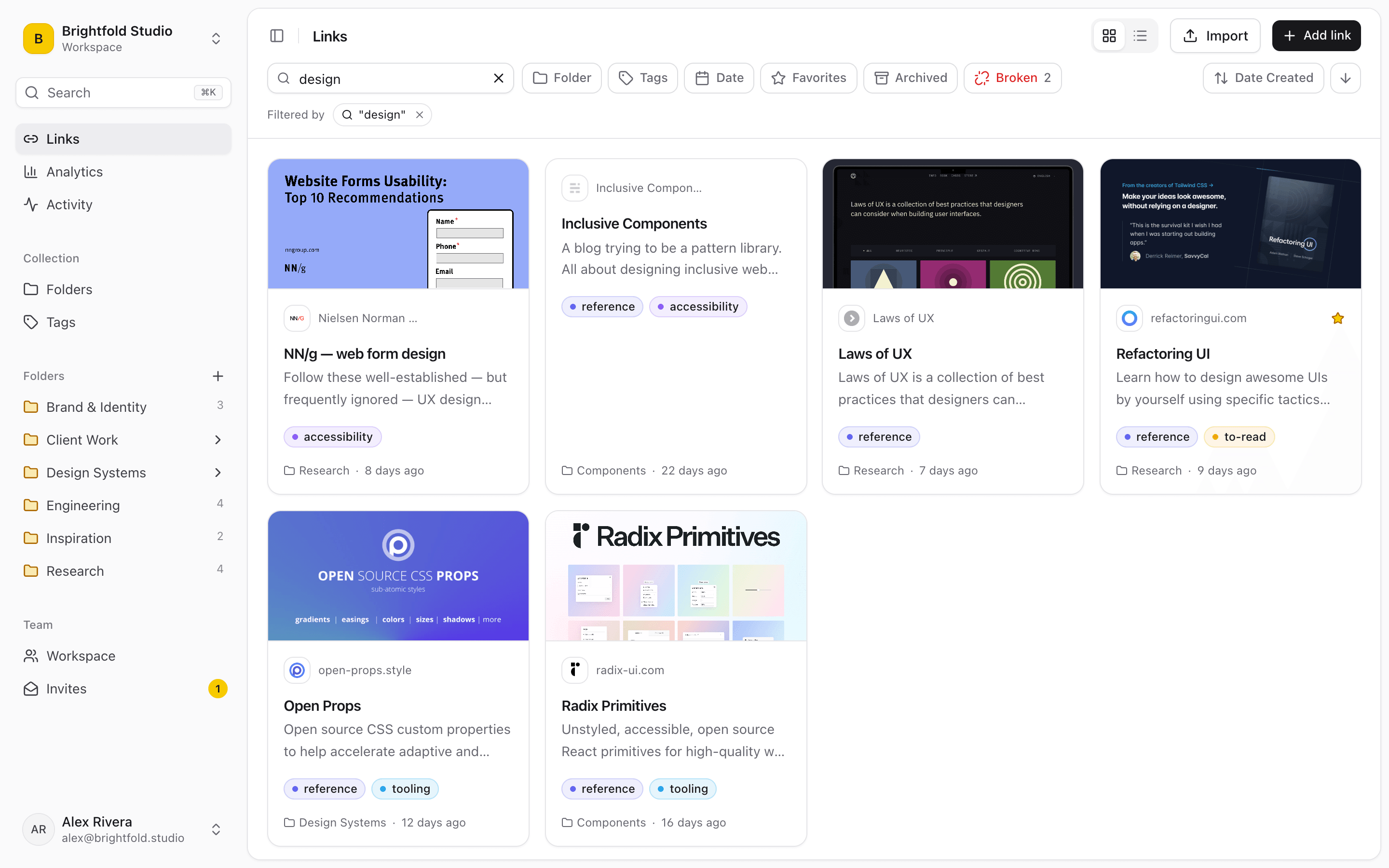
Search the things you'd actually remember
You rarely recall a page's exact title. You recall that it was on the vendor's domain, or that someone noted it as “the one with the migration table.” Every link has a note for exactly that context, and notes are searchable for the whole team.
- Matches title, URL, description, site name and note
- Title matches rank first, so the obvious result is on top
- Filter by folder, tag, favorite or broken links
- ⌘K searches links and folders from anywhere in the app
- Search every workspace you belong to from the extension picker
What it doesn't search
Linkbry doesn't index the full contents of the pages you save — it searches what's stored on the link itself, including the page's description from its preview. If you need search inside page text or archived copies, a tool built for archiving (Raindrop.io Pro, Linkwarden or Karakeep) is the better fit.
Search without opening Linkbry
In the Chrome extension, type ;; in any text box — Slack, Gmail, Notion, a Jira ticket — and search your saved links right at the cursor. Enter inserts the one you want.
Start organizing your links today
Free forever for one person. No credit card needed.